How it works

How Local works

From sign-up to a profile people can find, in six simple steps. You can be set up in minutes.

  1. Step 01

    Sign up in a minute

    Create an account with your email or Google. We send a short code to confirm your email, and that's it. No fees and no card. Local is for anyone 13 and over.

    • Email or Google sign-up
    • Pick your username, it becomes your link
    • Works on any phone or computer
  2. Step 02

    Tell your story

    A guided setup walks you through the basics. Skip anything you're not ready for and come back to it later.

    • Photo, headline and a short bio
    • Your field and where you're based
    • Education, from O Level to degree
    • Your dreams and what help you need
  3. Step 03

    Show your work

    Add projects with photos, a gallery of your best shots, and links to everywhere else you are online.

    • Projects with photos and status
    • A photo gallery
    • Instagram, TikTok, LinkedIn, WhatsApp and more
  4. Step 04

    Make it look like you

    Choose one of six page designs, then a colour palette made for it. Preview it before anyone else sees it.

    • Six designs, from bold to classic
    • Curated colour palettes that stay readable
    • Live preview before you publish
  5. Step 05

    Go live

    Our team takes a quick look at every new profile before it goes public. It keeps Local free of spam and fake accounts, so real profiles get the attention.

    • A short review by a real person
    • A notification when you're live
    • Edits are checked the same way
  6. Step 06

    Share and get discovered

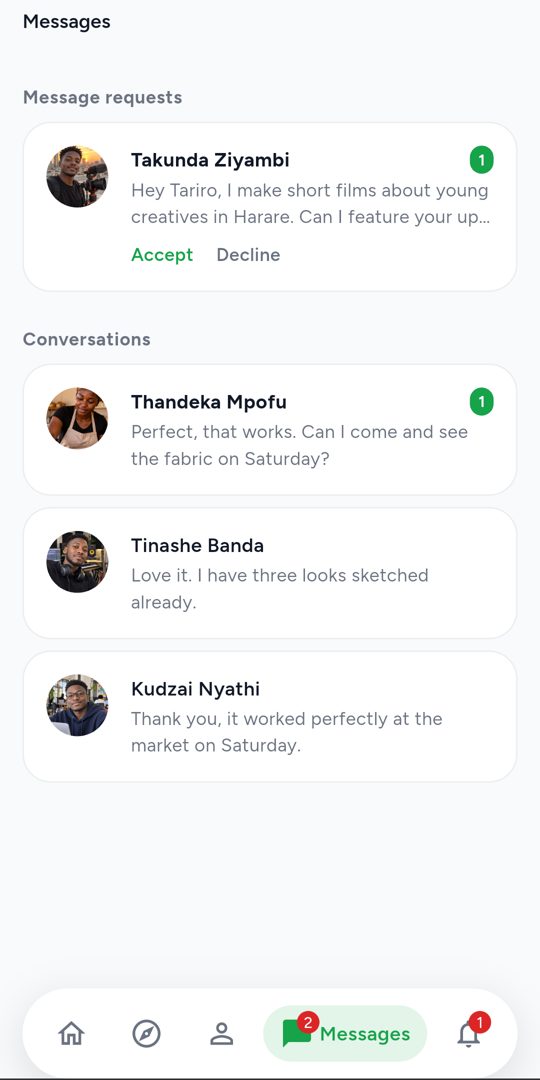
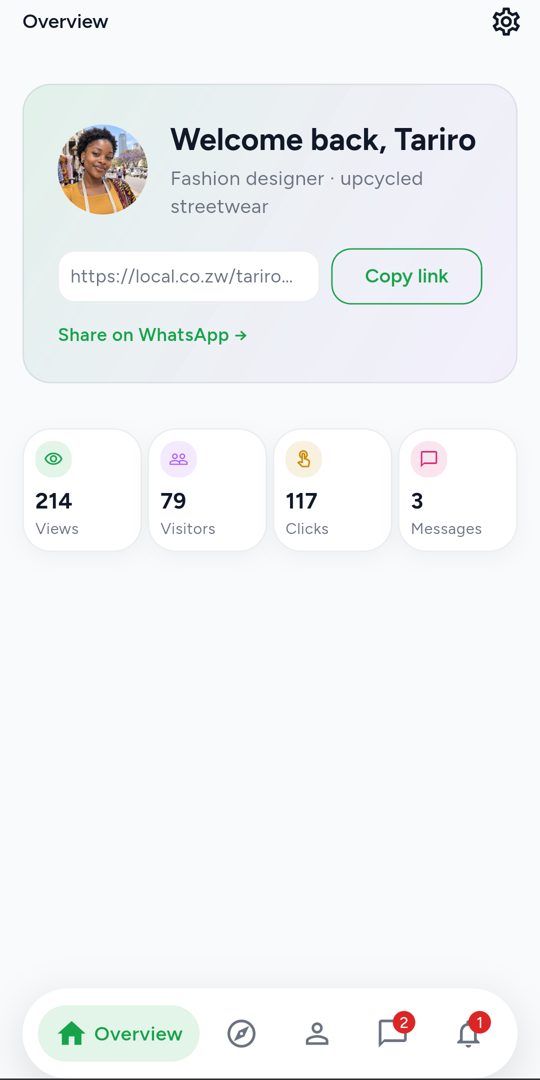
    Put your link in your WhatsApp status, your bio or a job application. People can also find you in the directory by field and province, and message you on Local.

    • One short link: local.co.zw/you
    • Listed in the public directory
    • See your views and link clicks
    • Message requests you can accept or decline

On your phone

Your profile in your pocket

The Local Android app, coming soon to Google Play, has everything the website does: build and edit your profile, change its design, check how many people viewed it, and reply to messages with notifications as they arrive.

  • Views, visitors and link clicks at a glance
  • Push notifications for new messages
  • Share your link to WhatsApp in one tap
Questions people ask

Is Local really free?

Yes. Creating, editing and sharing your profile costs nothing, and there are no ads on your page.

How old do I need to be?

You need to be 13 or older. If you're under 18, ask a parent or guardian before you sign up.

Do I need a laptop?

No. Local is built for phones first and loads quickly on slow mobile data. You can do everything from your phone.

Why is my profile being reviewed?

Every new profile is checked by a person before it goes public. This keeps the directory free of spam and fake accounts. You'll get a notification as soon as you're live.

Who can see my profile?

Once approved, anyone with your link can see it, and it appears in the directory. You can take your profile out of the directory at any time from your settings.

Can people contact me?

Signed-in members can send you a message request. Nothing reaches your inbox until you accept, and you can report anyone who misbehaves.

Can I delete my account?

Yes, at any time from your settings. Your profile and everything on it is removed.

Your work deserves to be seen.

Set up your free profile in minutes and start sharing one link that shows the world what you do.